The Hidden Technology That Keeps Large Properties Seamlessly Connected
A guesthouse can be only a short walk from the main residence yet have an unreliable internet connection. A detached office, garage, gatehouse, or pool pavilion may present the same problem. Large properties need more than a powerful router in the main house: they need a dependable connection between buildings and carefully placed wireless access within each space. Where a suitable radio path exists, wireless bridges can provide that connection without a continuous underground cable route.
For homeowners, the appeal is practical as well as aesthetic. Connecting a garden office should not automatically mean cutting through a finished driveway or disturbing mature landscaping. Wireless links offer another option, provided the design accounts for sightlines, local power, capacity, and ongoing maintenance. The technology can remain visually discreet while the planning behind it is anything but casual.
Think of the Property as Several Connected Spaces
A large residence is rarely one uniform wireless environment. The main house may contain thick walls and several floors, while a guest cottage has its own construction and an office sits beyond a garden. Outdoor seating introduces another set of coverage conditions.
Start by listing what each location needs. Guest accommodation may require reliable video streaming and calls. A detached office may depend on sustained uploads and access to business services. A gatehouse might support cameras and communications, while the pool area needs coverage where people actually sit.
These uses should shape the design. A camera producing continuous traffic is different from a phone checking messages, and an occasional visitor is different from several people joining meetings at once. Record normal demand and busy periods before discussing equipment or installation positions.
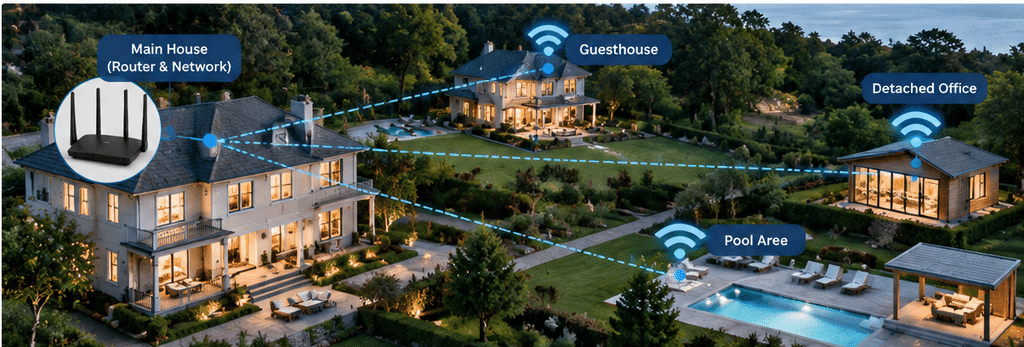
Figure 1. Large properties often include separate spaces with different WiFi coverage needs, from the main house to guest accommodation, a detached office, and outdoor areas.
Why Underground Cabling Is Not Always a Small Project
A wired connection between buildings can be an excellent long-term choice, especially where suitable conduit already exists or construction is underway. Fiber is particularly worth assessing for interbuilding routes, with the appropriate design and installation advice.
Retrofitting a finished property can be more involved. The route may cross paving, planted areas, retaining structures, or utilities. Excavation, access arrangements, permissions, reinstatement, and disruption can account for more of the project than the cable itself.
Wireless does not make those considerations disappear in every case. Radios still require mounting points, local cables, power, and a safe installation. Its potential advantage is avoiding a continuous physical data route across the grounds where the buildings can communicate over a suitable radio path.
Compare complete proposals rather than assuming that one approach is always cheaper. A straightforward existing conduit may favor fiber; a difficult excavation with clear sightlines may make wireless attractive. Include maintenance access and future capacity in the comparison.
The Bridge Between Buildings
A point-to-point wireless bridge typically uses two compatible directional radios aimed toward one another. One connects to the network at the main house, and the other connects to equipment in the remote building. Data crosses the space between them by radio rather than through a buried cable.
A typical path might run from the main router through a local switch to the first bridge radio, across the garden to the second radio, and then to a guesthouse switch and access point. The access point supplies WiFi inside the guesthouse; the bridge supplies its connection back to the main network.
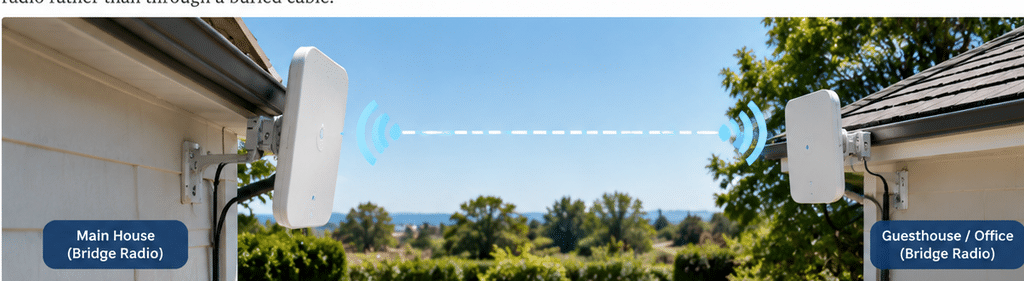
Figure 2. Two directional radios can form a point-to-point wireless bridge between buildings, carrying network data without a continuous underground cable.
This distinction helps explain why a domestic range extender is not necessarily the right answer for a detached building. A bridge is planned around a fixed link between sites. Local WiFi is planned around the phones, laptops, and other devices used in each space.
The bridge does not create a second internet service or increase the capacity of the existing subscription. Several buildings may still share one upstream connection, so the overall service must be adequate for their combined activity.
A Clear View Requires More Than a Glance
Two buildings that appear visible from the lawn may not have an appropriate path between realistic mounting locations. Trees, rooflines, garden structures, and changes in ground level can interfere with the proposed connection.
Radio planning also considers the Fresnel zone, a volume around the direct path between antennas. Objects entering that area can increase signal loss even when the endpoints remain visually visible. An installer should assess the route using the chosen equipment and verify important assumptions onsite.
Seasonal changes matter. A path assessed through bare branches may behave differently once foliage returns. Future landscaping, temporary structures, and moving equipment should also be considered. Buying a radio with a longer advertised range cannot reliably compensate for a blocked route.
Where a direct link is unsuitable, an alternative mounting position, a carefully designed relay, or a wired route may be needed. A relay brings additional equipment and maintenance responsibilities, so it belongs in the original budget rather than being treated as an afterthought.
Local Power Makes the Wireless Link Useful
Each end of the connection still needs electricity. Inside the remote building, switches distribute data to access points and other compatible equipment. Where appropriate, PoE switches for property networks can also supply power over the same Ethernet cables, reducing the need for a separate outlet beside every supported device.
Power over Ethernet is particularly useful when an access point belongs on a ceiling or a camera needs a high mounting position. Some bridge radios can also receive power this way, but the exact power method must be checked. Passive PoE and standards-based PoE are not interchangeable by default.
Specify both the required power on each port and the switch’s total budget. Leave capacity for planned additions, and confirm that the switch and connected devices negotiate or receive power as intended. A device appearing online does not always establish that all of its features have adequate power.
PoE does not send electricity across the wireless gap. The remote switch or injector needs its own local supply. If continuity matters, backup power should support every component needed along the route, including the main gateway and both bridge endpoints.
Give Each Building Its Own Coverage Plan
Once data reaches the remote building, it needs to reach the people using it. An access point near the bridge termination may not cover a bedroom behind several walls or a desk at the opposite end of a garage.
Position local access points around the layout, construction, and expected users. For outdoor areas, assess the actual seating and walking zones and use equipment suited to the exposure. A strong radio link across the property does not prove that a handheld device has a reliable connection beside the pool.
Indoor equipment should remain within its environmental limits. Outdoor mounts, cable entries, and enclosures need attention to moisture, temperature, wind, and corrosion where relevant. Follow manufacturer instructions and local requirements for electrical protection, bonding, grounding, and surge protection.
A cohesive experience may involve coordinated access points, but matching network names alone does not guarantee uninterrupted roaming. Client devices, authentication settings, and supported network features influence how a connection changes between coverage areas. Test movement through the property with the devices residents actually use.
Keep the Infrastructure Discreet and Serviceable
Technology should respect the architecture without sacrificing the radio path. A suitable mounting position may be a less prominent wall or existing service area, but hiding a radio behind dense planting or metal screening can undermine the connection.
Agree on equipment locations and visible cable routes before installation. Consider how the appearance changes from terraces, guest rooms, and neighboring viewpoints. Avoid improvised attachments to decorative structures without checking their suitability and the necessary permissions.
Maintenance access deserves the same attention. A radio that requires specialist access equipment for every adjustment may create avoidable running costs. Stable mounts, labeled cables, documented positions, and sensible access arrangements make a discreet installation easier to support over time.
Preserve ventilation and manufacturer clearances wherever equipment is concealed. Attractive joinery is not a substitute for an appropriate equipment space, especially where switches and power supplies generate heat.
Plan for Privacy and Practical Management
A single property can contain several groups with different access needs: residents, guests, staff, and connected systems. They do not all need access to the same devices or administrative interfaces.
Where suitable equipment supports it, use network segmentation and firewall policies to separate guest access from private systems. Multiple wireless names alone do not establish that separation. Check that bridge and switching equipment can carry any required network configuration correctly from one building to another.
When comparing networking solutions for large properties, evaluate management and support alongside wireless performance. Ask who applies updates, holds configuration backups, monitors faults, and replaces failed components. Verify any controller or cloud requirements and the effect of losing access to those services.
Keep administrative credentials secure and provide residents or property staff with appropriate instructions. Routine use should be straightforward, while configuration changes remain controlled. The aim is a property network that can be managed consistently rather than a collection of independent devices with undocumented settings.
Measure the Experience Before Calling the Work Complete
Commission the system under representative conditions. Run calls from the detached office, stream video in the guesthouse, and test the advertised outdoor coverage while other devices are active. Check useful throughput in both directions, delay, packet loss, and link stability against the planned requirements.
Test more than the bridge radios. Verify the local WiFi, switch connections, internet service, and any application the property relies on. A high radio link rate does not demonstrate that the full route can support the expected workload.
Record baseline measurements, equipment locations, and configuration details. During an agreed maintenance window, check recovery after a controlled interruption and confirm that monitoring or alerts reach the responsible person. For essential gate communications or security functions, assess any need for independent backup arrangements with the relevant specialist.
A clear handover should identify the installer, service contacts, and safe troubleshooting steps. That information reduces the chance that a minor problem becomes a series of unnecessary resets across several buildings.
Connection That Fits the Property
The most successful large-property networks make different spaces feel connected without forcing every building to rely on the main house’s WiFi signal. Wireless bridges can carry data between suitable fixed sites, local access points serve the rooms and outdoor areas, and compatible PoE equipment simplifies connections within each location.
The result depends on planning rather than a promise of unlimited range. Compare wireless with available wired routes, validate sightlines, provide dependable power, and test the activities that matter. With those decisions made carefully, a guesthouse, office, garage, or pool pavilion can become a useful extension of the property without automatically turning the grounds into a construction site.