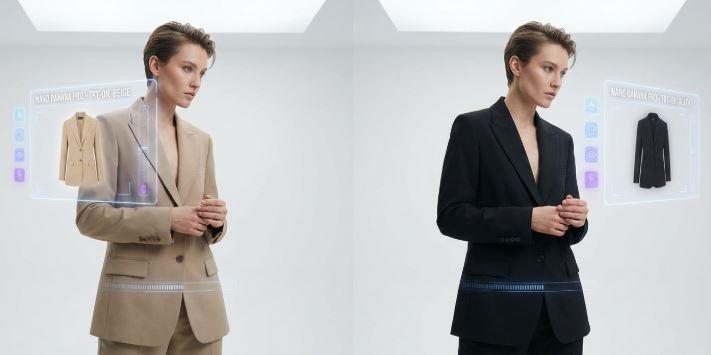
Nano Banana to Seedance 2.5: How to Turn Fashion Photos Into Video Ads Without Changing the Clothes
The difficult part of turning a fashion photograph into a video ad is not making the model move. It is keeping the garment commercially recognizable while that movement happens. A clip can look polished and still be unusable if a neckline shifts, a print slides across a seam, or a six-letter label returns with seven letters.
A dependable Nano Banana-to-Seedance 2.5 workflow treats the approved photograph as a product record, not loose inspiration. Nano Banana prepares a clean key image. Seedance 2.5 adds restrained motion. Four checks—fit, fabric, print, and logo—decide which results survive. This is a production method for moving images, not a collection of tricks for repairing unrelated static-image prompts.
Begin With a Garment Record, Not a Mood Board
Before editing anything, collect the views that explain what is actually being sold. A front view may establish the silhouette but hide the back closure. A three-quarter view can show volume while concealing a side print. If those details matter to the listing, one attractive photograph is not enough evidence.
Build a small reference set from approved photography:
- one clean front or hero view;
- one view that reveals the side or back construction;
- one close crop of the print, embroidery, hardware, or label;
- the product page’s written color and material description.
The source image should also be suitable for motion. Leave room around sleeves, hems, hair, and hands. Avoid a crop that cuts through the part of the garment expected to move. A straight-on image with readable construction usually gives a cleaner baseline than an extreme editorial angle.
Use Nano Banana to Prepare the Key Image Without Redesigning It
Nano Banana is useful here as a controlled editing pass. The aim is to remove distractions or establish a setting while leaving the clothes alone. Ask for one change at a time: simplify the background, balance the light, or widen the canvas for a vertical composition. Do not combine a new location, a new pose, a new hairstyle, and dramatic relighting in one instruction.
A restrained instruction can read:
Replace only the background with a warm gray studio wall. Keep the person, pose, body proportions, garment silhouette, seams, fabric texture, print scale, hardware, label, and color unchanged. Do not add accessories or text.
Save the approved key image as a new asset rather than overwriting the product photograph. The original remains the commercial reference; the edited still becomes the starting frame for motion.
Define the Four Checks Before Generating Video
“Looks consistent” is too vague for approval. Each reviewer will interpret it differently, and small alterations can pass unnoticed on a phone screen. A four-part rubric turns the decision into something repeatable.
| Check | What must stay stable | Common failure | Review method |
| Fit | Silhouette, neckline, waist, sleeve and hem length | The garment tightens, lengthens, or changes cut during a turn | Compare the opening, middle, and final frame with the source |
| Fabric | Texture, weight, drape, sheen, and transparency | Denim behaves like silk; knit texture disappears; reflections become plastic | Watch once at normal speed, then inspect frames during the largest movement |
| Motif shape, scale, position, repeat, and seam alignment | A pattern swims across the body or invents a new repeat | Pause at shoulder, waist, side seam, and hem | |
| Logo | Spelling, proportions, color, placement, and orientation | Letters mutate, mirror, or detach from the product | Compare a 100% crop with the approved detail photograph |
Give Seedance 2.5 a Motion Brief, Not a Second Clothing Brief
The key image already describes the outfit. Repeating a long account of its color, cut, and decoration in the video prompt can invite reinterpretation. The motion brief should state what moves, how the camera behaves, and what must remain fixed.
A five-second version of this proof can also be run with Seedance 2.0. Moving to Seedance 2.5 may change the reference and editing options available for the larger campaign, but it does not change the four acceptance checks. If an existing Seedance 2.0 shot already meets the brief, a newer model name is not a reason to reopen it.
Use a compact structure:
SUBJECT ACTION: The model makes one slow quarter-turn and settles.
CAMERA: Locked medium-full shot; no orbit, zoom, or cut.
GARMENT MOTION: Natural movement only at the hem and sleeves.
KEEP FIXED: Body proportions, fit, seams, fabric texture, print placement,
hardware, logo spelling, background, and lighting.
AVOID: New accessories, pose change, hidden hands crossing the logo,
extreme fabric movement, text, or a second person.
One action is enough for the first pass. Walking, spinning, touching the garment, and changing camera angle at the same time create too many opportunities for drift. A quarter-turn or two-step walk provides useful fabric motion while keeping the review manageable.
Load the approved key image into ClipDance, select Seedance 2.5, and make a short proof with the intended aspect ratio. Five seconds is long enough to expose many fit and texture problems without turning the first attempt into a full ad. Keep the prompt, duration, ratio, and source-file version in the review note.
Review the Clip in Three Passes
Do not judge everything at once. A beautiful camera move can distract from a moving seam, while frame-by-frame inspection can make physically normal fabric motion look suspicious. Three passes separate those concerns.
Pass one: watch the advertisement
Play the clip once at normal speed with no pausing. Check whether the action reads immediately, the garment stays visible, and the framing leaves safe space for later copy. This is the audience view.
Pass two: inspect the product
Mute the clip and stop at the beginning, the point of greatest motion, and the final frame. Work through fit, fabric, print, and logo in the agreed order. A failed logo is still a failure if everything else looks convincing.
Pass three: check editability
Ask whether the selected clip can survive trimming, captions, and a final product card. Look for a stable opening or closing frame and enough quiet space for layout. Do not ask the generator to create prices, promotional copy, or legal text inside the scene; add exact typography during editing.
Give each check a simple result: pass, review, or reject. “Review” should mean a named person will make a decision, not that an uncertain clip quietly moves forward.
Scale Only the Shot That Passed
Once one motion pattern clears the rubric, freeze its inputs. Keep the approved image, motion brief, model choice, aspect ratio, duration, and any seed or generation setting shown in the job record. Changing several of them at once makes later differences impossible to diagnose.
For a larger catalog, send that locked specification through reAPI and submit one job per approved product image. Record the returned task identifier beside the SKU, then collect the output and usage information when the job finishes. This turns the accepted shot into a repeatable batch without pretending that separate generations will be pixel-identical.
A batch manifest can stay very small:
| Field | Example entry |
| SKU | DRESS-014-BLUE |
| Source asset | Approved vertical key image, version 03 |
| Motion brief | Quarter-turn, locked camera, restrained hem movement |
| Output | 9:16, five seconds |
| Review priority | Print, fit, fabric, logo |
| Decision | Pending / accepted / rejected |
Know When to Stop Generating
Regeneration is not always the right repair. If a logo remains unstable, remove it from the generated portion and end on an untouched product card. If a patterned sleeve repeatedly changes during a turn, reduce the action to a breathing pose or locked close-up. If the garment’s fit changes even with minimal movement, return to the key image and choose a clearer source angle.
FAQ
Can one fashion photograph support a full turn?
It can guide a limited turn, but it does not reveal unseen construction. Keep movement within what the photograph and approved reference views can support. Use real back and side photography when those views carry selling details.
Should the logo be included in the video prompt?
The source image should carry the logo. Add a short preservation constraint, then inspect the result closely. When exact lettering does not hold, use an untouched logo or product card during the final edit rather than accepting generated text.
Does using the same prompt make every SKU consistent?
No. The prompt can standardize direction, but material, pose, crop, and garment construction still affect each result. Review every output against its own approved product record.