
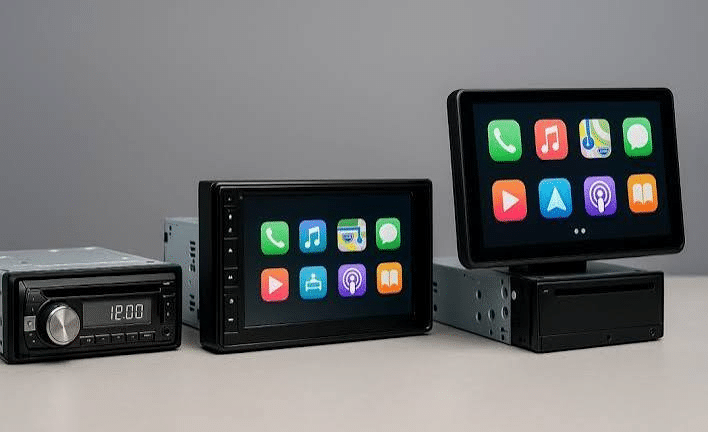
What Drivers Should Know About Screen Size and Connectivity in a Head Unit for Car
The factory stereo may lack features that drivers now expect, such as Apple CarPlay, Android Auto or a larger touchscreen. Replacing it with a suitable head unit can add these features, provided the new unit fits the vehicle and supports its existing systems.
A large screen and extra features are useful only if the unit fits your dashboard and works with your devices. Choose a head unit that suits your vehicle and the features you use most.
Screen Size and Visibility: What to Know
Check Your Stereo Slot First
Start by measuring the radio slot in your dashboard. Car stereos come in two standard sizes: single-DIN and double-DIN. A single-DIN chassis is about 2 inches tall, while a double-DIN chassis is about 4 inches tall. Both are roughly 7 inches wide.
These measurements refer to the stereo’s mounting size, not the screen itself. That’s why a head unit with a large display may still fit a smaller stereo opening.
However, the dashboard opening is only part of the picture. There can be brackets, wiring, or air-conditioning ducts behind the factory stereo. A mounting kit or replacement fascia may also be needed. Checking these details beforehand can help prevent installation problems.
Think About Where the Screen Will Sit
A screen that fits the stereo opening may still cause problems once installed. This is particularly true of floating displays. They extend out from the dashboard instead of sitting inside it.
The extra screen space can be useful. This is especially true if the original stereo slot is small. But the display shouldn’t cover an air vent or make the hazard-light button difficult to reach. Depending on its position, it could also obstruct other controls.
Look at the screen’s dimensions. You shouldn’t just check its advertised diagonal size. If the display tilts or slides, check how much room it requires to move. Measure the available space before buying a head unit to help avoid fitting issues.
Don’t Judge the Display by Size Alone
A larger display will not help much if the resolution is poor. Display with lower resolutions can make map text and icons appear blurry.
Screen visibility can vary in bright sunlight. Compare display brightness, resolution and anti-reflective features when choosing a head unit for car. These factors can help keep maps and text readable in different lighting conditions.
Check your dashboard height, too. If the stereo sits low on the dashboard, you may need to look down at it from an off-angle. Screen visibility can also vary when viewed from the side, so check how easily you can read the display from the driver’s seat.
How Connectivity Affects Your Head Unit
Wireless Freedom vs. Wired Stability
Wireless Apple CarPlay and Android Auto let you connect your phone without plugging it in. Check that the head unit supports your preferred system and phone model. Connection performance can vary depending on the unit and setup, so review the manufacturer’s specifications before buying.
With wireless smartphone connectivity, check whether the unit has an accessible USB port for charging. A cable can also provide a wired connection on compatible models.
Know Your Connectivity Options
Bluetooth supports hands-free calls and wireless audio streaming. Apple CarPlay and Android Auto also provide access to compatible apps, navigation and other phone features through the head unit.
USB ports can serve two purposes. They can charge your device and transfer data for wired smartphone projection or media playback from a USB drive. Always check whether a given port actually transfers data or just supplies basic power.
Some head units use Wi-Fi to support wireless Apple CarPlay or Android Auto. Connection performance can vary by model, so check the manufacturer’s specifications and phone compatibility before buying.
Check Your Car’s Existing Features
Some factory features, including steering wheel controls, reverse cameras and factory amplifiers, may need compatible adapters or interfaces when you replace the head unit. The parts required depend on your vehicle and existing audio system. A compatible wiring harness can simplify installation, while some vehicles may need CAN-BUS modules or camera adapters to retain existing features. Check compatibility before buying.
Conclusion
The right head unit should suit your dashboard, connect reliably with your phone and work with your vehicle’s existing features. Compare screen dimensions, wired and wireless connectivity, and adapter requirements before making a decision.