What Makes a Good AI Video Generator? Key Features Explained
AI video tools are improving fast. Every month there are new models, new platforms, and new features. For creators, marketers, and filmmakers, the challenge is no longer finding an AI video generator. The challenge is choosing a good one.
Not all AI video tools are equal. When I evaluate an AI video generator, I do not only look at how the video looks. I look at the entire workflow. A good tool should help turn an idea into a finished video quickly and reliably.
In this guide, I will explain the features that actually matter when choosing an AI video generator.
Why AI Video Generators Are Becoming Essential Creative Tools
Video has become the main format for online content. Social media platforms favor video. Marketing teams rely on video. Creators use video to grow audiences.
Traditional video production takes time. You need planning, filming, editing, and design. AI video tools simplify many parts of that process.
Instead of filming everything manually, creators can now generate scenes with prompts, images, or references. This makes experimentation much easier.
A creator can test multiple concepts in minutes. A marketing team can generate variations of ads quickly. A filmmaker can visualize scenes before filming.
This shift is why AI video tools are becoming part of everyday creative workflows.
But the quality of tools varies a lot. Some tools focus only on generating clips. Others support the entire creative process.
That is why understanding the key features of a good AI video generator matters.
Core Features Every Good AI Video Generator Should Have
When I test an AI video tool, I usually look for a few core generation features first. These determine how flexible the platform will be.
Text to Video Generation
Text to video is the starting point for many AI video tools.
You write a prompt. The AI generates a scene based on that description.
This is useful for quick idea testing. I can describe a scene, a character, or an action and see how the model interprets it.
A good text-to-video system should understand:
- scene descriptions
- character actions
- visual style
- camera movement
The more accurately the model understands prompts, the easier it becomes to control results.
Simple prompts should produce clear outputs. More detailed prompts should allow deeper control.
Image to Video Capability
Image to video is another important feature.
Sometimes I already have a visual reference. It could be a character design, a product photo, or a concept image.
Image-to-video tools animate that image into motion.
This feature helps with:
- character animation
- product visualization
- stylized scenes
It also improves consistency. If I start with the same reference image, the generated video usually keeps the same subject and style.
Reference to Video Generation
Some AI tools go a step further. They allow multiple reference inputs.
For example:
- an image for the character
- a style reference
- a scene reference
This gives the model more guidance. The results become more predictable.
Reference-based generation is useful when creators want stronger visual control.
AI Model Quality and Output Realism
Generation features are important, but the model quality is what determines whether a video looks believable.
Several factors affect output quality.
Scene Consistency
One common problem with AI video is inconsistency.
Objects may change shape. Characters may look different between frames. Background elements may shift unexpectedly.
A strong AI model keeps scenes stable.
Consistency matters for:
- storytelling videos
- character animations
- marketing visuals
Without consistency, editing becomes difficult.
Natural Motion
Motion quality is another key factor.
The best AI video generators produce smooth movement.
This includes:
- natural body motion
- realistic object movement
- stable camera motion
Poor motion makes videos look artificial. Good motion makes the scene feel alive.
Visual Style Control
Creators often want different visual styles depending on the project.
A good AI video generator should support multiple styles, such as:
- cinematic scenes
- realistic footage
- stylized animation
Style flexibility allows the same platform to work for different creative projects.
Workflow Features That Make AI Video Tools Powerful
Video generation is only part of the process. After generating a clip, creators often need to adjust or refine the result.
That is where workflow features become important.
Built in AI Video Editing Tools
A good platform should allow creators to modify generated videos.
Useful editing tools include:
- object removal
- scene extension
- color adjustments
- visual effects
These features help refine clips without exporting them to other software.
When editing tools are built into the platform, the workflow becomes much faster.
AI Image Generation Integration
Images often play a big role in video creation.
Before generating a video, creators may want to design characters or scenes.
An integrated image generator allows creators to produce visuals such as:
- character references
- product visuals
- concept art
- thumbnails
These images can then be turned into videos.
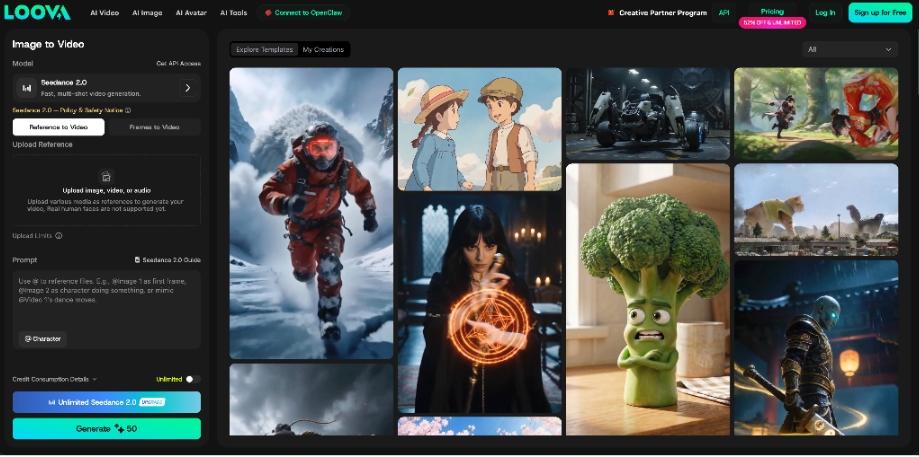
Platforms like Loova combine AI image generation and AI video tools in one workspace. This makes it easier to move between image creation and video generation.
Multi-Model Support

Another feature I look for is support for multiple AI video models.
Different models often specialize in different styles or behaviors.
For example, one model may produce cinematic scenes. Another may create stylized animations.
Platforms that integrate several models allow creators to test different approaches quickly.
Instead of switching between multiple tools, everything happens in one environment.
Ease of Use and Prompting Experience
AI video tools should not require complex technical knowledge. The best platforms make prompting simple.
Prompt Simplicity for Beginners
Many beginners hesitate to try AI video tools because they think prompting is complicated.
In reality, most modern systems accept natural language prompts.
For example, a simple prompt might describe:
- the subject
- the action
- the environment
Good tools guide users with prompt examples or templates.
This lowers the barrier for new creators.
Advanced Controls for Creators
While simplicity matters, experienced users often want deeper control.
Advanced prompt instructions can include:
- camera angles
- lighting style
- motion direction
- scene composition
When a platform supports detailed prompts, creators can shape the output more precisely.
This flexibility is useful for storytelling or cinematic content.
Performance and Generation Speed
Speed matters more than many people expect.
When I work with AI video tools, I rarely generate only one video. I usually test several variations.
This means generation speed affects productivity.
Rendering Time
Fast rendering allows creators to iterate quickly.
For example, if a video takes several minutes to generate, testing ideas becomes slow.
But if results appear quickly, creators can explore more variations.
This improves the creative process.
Iteration Speed
A good AI video tool should make it easy to adjust prompts and regenerate clips.
Iteration is essential for creative work.
A typical workflow might look like this:
- write a prompt
- generate a video
- adjust the prompt
- generate another version
The faster this loop becomes, the more efficient the workflow feels.
Scalability for Content Creation
AI video tools are used by different types of users. Each group has different needs.
AI Video for Creators
Content creators often produce videos regularly.
They may need videos for:
- YouTube content
- short-form social media videos
- storytelling projects
AI video tools help them create visual content without large production setups.
AI Video for Marketing Teams
Marketing teams use video in many campaigns.
They may generate:
- product videos
- ad creatives
- promotional visuals
AI video generation allows teams to test multiple visual concepts quickly.
This improves campaign experimentation.
AI Video for Filmmakers
Filmmakers also use AI tools in early production stages.
These tools help with:
- concept visualization
- scene testing
- storyboarding
Instead of describing scenes verbally, creators can generate visual previews.
This improves creative planning.
Why All-in-One AI Platforms Are Becoming Popular

Many creators start by using separate tools for each step of the workflow.
For example:
- one tool for images
- another tool for video generation
- another tool for editing
This approach works, but it can slow down the process.
That is why integrated AI platforms are becoming more popular.
Combining Video and Image Tools
When image generation and video generation exist in the same platform, creators can move between tasks easily.
For example:
- generate a character image
- turn the image into a video
- edit the video
This workflow becomes much smoother.
Loova AI focuses on combining AI video models, image generation tools, and editing features in one place.
This reduces the need to switch between multiple software tools.
Integrated AI Models
Some platforms integrate several AI models in one environment.
This allows creators to test different models without leaving the platform.
Benefits include:
- faster experimentation
- more visual styles
- flexible workflows
For creators who generate content frequently, this flexibility becomes very useful.
Example of an AI Video Workflow
A simple AI video workflow often looks like this:
Idea → Prompt → Video Generation → Editing → Final Output
With the right tools, each step can happen inside one platform.
This reduces friction and speeds up production.
How to Evaluate an AI Video Generator Before Choosing One
When choosing an AI video generator, I usually test a few practical things.
Questions Worth Asking
Some useful questions include:
- Does the platform support text-to-video and image-to-video?
- Can the tool maintain scene consistency?
- Are editing features included?
- Does the platform support multiple models?
These questions help reveal whether the platform supports a full creative workflow.
Testing Workflow Efficiency
The best way to evaluate a tool is to test it directly.
I usually generate several videos and look at:
- generation speed
- prompt accuracy
- editing flexibility
A good AI video tool should make creative experimentation easy.
Trying different tools is the best way to understand what works for your workflow.
FAQs
What features should a good AI video generator have?
A good AI video generator should support text-to-video, image-to-video, scene consistency, prompt control, and basic editing tools. These features allow creators to generate and refine videos efficiently.
What is the difference between text-to-video and image-to-video?
Text-to-video generates a video from a written prompt. Image-to-video animates an existing image. Image references often improve subject consistency.
How accurate are AI video generators today?
Modern AI video generators can produce realistic scenes, but results still depend on prompt quality and model capability. Some platforms provide better motion and scene consistency than others.
Can AI video generators create consistent characters?
Yes, especially when reference images are used. Image-based generation helps maintain character appearance across frames.
Are AI video generators useful for marketing content?
Yes. Marketing teams use AI video tools to generate product visuals, ads, and promotional content quickly. The ability to test many variations makes campaign optimization easier.
Do AI video generators replace traditional editing software?
Not entirely. AI tools simplify many tasks, but traditional editing tools may still be used for complex projects. However, many AI platforms now include built-in editing features.
Are AI video generators difficult to use?
Most modern platforms are designed for beginners. Simple prompts can generate videos quickly. Advanced controls are available for users who want more detailed results.
What is the advantage of using an all-in-one AI platform?
All-in-one platforms combine image generation, video generation, and editing tools in one place. This reduces workflow complexity and allows creators to move from idea to finished video faster. Loova AI is built around this integrated approach.