How to Choose the Right Laser Engraver for Your Home Crafts
A laser engraver can take your home crafting projects to another level. Whether you enjoy making personalized gifts, wooden decorations, custom signs, or handmade accessories, a laser engraving machine allows you to create detailed designs with a level of consistency that is difficult to achieve with traditional hand tools. However, choosing the right machine is not always straightforward. Laser engravers come in different types, power ratings, working areas, and configurations. Some are designed for small hobby projects, while others are better suited to larger pieces and regular production.
If you are planning to buy your first laser engraver for home crafts, the goal should be to find a machine that matches the materials you want to work with, fits your available workspace, and gives you enough flexibility to explore different projects without paying for capabilities you do not need. Here are five important factors to consider before making your decision.
1. Start With the Materials You Want to Work With
The first thing to consider is the type of material you plan to engrave or cut. This is arguably more important than the machine’s wattage because different laser technologies interact with materials differently.
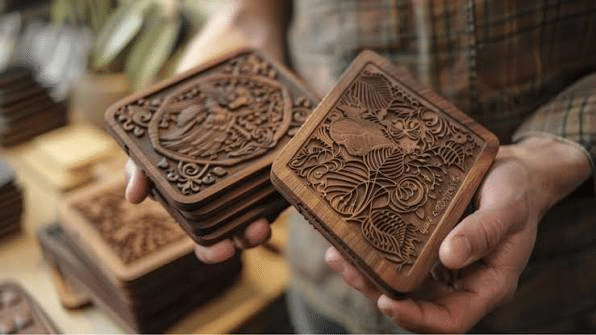
For example, CO2 laser engravers are particularly useful for working with wood, acrylic, leather, paper, cardboard, and certain fabrics. They are a popular choice for home crafters because these materials cover a wide range of common DIY projects. You could use a CO2 laser to:
- Engrave personalized wooden gifts and cutting boards.
- Cut decorative shapes from plywood.
- Create custom acrylic signs and ornaments.
- Personalize leather accessories.
- Produce invitations, gift tags, and paper decorations.
Diode laser engravers are another option, especially if you primarily work with wood, paper, leather, and certain coated or dark-colored materials. However, their ability to cut transparent acrylic is limited, and they are generally less versatile than CO2 machines for many craft applications.
Fiber lasers serve a different purpose. They are primarily designed for marking and engraving metals, making them more suitable for jewelry, metal tags, tools, and personalized metal accessories.
The important thing is to avoid buying a machine simply because it has a high power rating. A 100W fiber laser, for example, is not necessarily a better choice than a 40W CO2 machine if your main projects involve cutting wood and acrylic.
2. Choose the Right Laser Power for Your Projects
Once you understand which materials you want to work with, the next step is choosing an appropriate laser power rating. Laser power influences how quickly a machine can process materials and how effectively it can cut through different thicknesses. However, higher wattage does not automatically translate into better engraving quality.
For most home crafting applications, a CO2 laser in the 40W–60W range offers a practical starting point. A machine in this range can handle many common engraving projects and cut suitable materials at reasonable speeds. It also provides more flexibility than a low-powered machine when you begin experimenting with thicker wood or larger projects.
For example, if you mainly want to engrave small wooden ornaments, personalized gifts, and decorative pieces, a 40W CO2 machine may be sufficient. If you expect to cut thicker materials, produce larger designs, or work on multiple pieces regularly, a 50W–60W machine may be a more suitable investment.
Remember that the material itself matters. Different wood species, plywood adhesives, acrylic formulations, and material thicknesses can affect the results. Always follow the manufacturer’s recommended processing guidelines and test new materials before starting a full project.
3. Consider the Working Area and Machine Size
Another important consideration is the machine’s working area. This determines the maximum size of the material you can process in a single setup. If you are only making small accessories, jewelry, and keychains, a compact desktop laser engraver may be sufficient. However, if you want to create larger wall decorations, signs, or multiple products in one batch, a larger working area will make your work easier.
Think about the types of projects you expect to make over the next year, not just the first few items you plan to engrave. A larger working area also provides more flexibility when arranging multiple designs on a single sheet. Instead of processing each item separately, you can position several designs together and complete them in one job.
Of course, you should also consider the machine’s overall dimensions. A laser engraver for home use needs enough room for the machine itself, ventilation equipment, material storage, and safe access for maintenance. Measure your available workspace before ordering, and remember that the machine may need additional clearance for exhaust connections and other accessories.
4. Look for Features That Make Crafting Easier
The technical specifications are important, but the machine’s practical features can make an equally significant difference to your daily workflow.
For home crafters, several features are particularly useful.
- Autofocus: Setting the correct focal distance is essential for consistent engraving and cutting. An autofocus system can simplify this process, especially when working with materials of different thicknesses.
- Camera positioning: A built-in camera allows you to preview the material inside the machine and position your design more accurately. This is particularly useful when personalizing pre-cut items or working with expensive material blanks.
- Air assist: Air assist directs a stream of air towards the cutting area. It helps reduce flames, remove smoke and debris, and improve cutting results on suitable materials.
- Cooling system: CO2 laser tubes generate heat during operation and require appropriate cooling. A reliable cooling system helps maintain stable operating temperatures and supports consistent performance.
- Rotary compatibility: If you plan to engrave cylindrical objects such as tumblers, bottles, or glasses, check whether the machine supports a compatible rotary attachment.
You do not necessarily need every feature available. Instead, prioritize the ones that will make a meaningful difference to the projects you actually intend to create.
5. Check Software Compatibility and Safety Requirements
A laser engraver is only as useful as the software and workflow that support it. Before purchasing a machine, check which design and laser control programs it supports. LightBurn is a popular option among hobbyists and small businesses because it offers tools for preparing artwork, arranging designs, and controlling compatible laser engravers. You should also consider the types of files you can import. Common formats such as SVG, DXF, PNG, and JPG are useful when working with vector designs, illustrations, and photographs.
Safety deserves just as much attention. Laser engraving and cutting can produce smoke, fumes, and airborne particles. A suitable exhaust system or fume extractor is essential, and the machine should be operated according to its safety instructions. Never leave a laser engraver operating unattended. More importantly, make sure every material you process is approved for laser use. PVC and other chlorine-containing materials, for example, can release dangerous gases and should never be laser processed.
Which OMTech Laser Engraver Is Worth Considering for Home Crafts?
If you want a machine that can handle more than occasional engraving projects, the OMTech Polar Lite 55W CO2 Laser Engraver is worth considering. Its 55W CO2 laser is suitable for a wide range of compatible craft materials, including wood, acrylic, leather, and certain fabrics. This gives home crafters the flexibility to experiment with different product categories without needing separate machines for every application.
The Polar Lite also features a 500 × 300 mm working area, providing enough room for larger decorative projects or multiple smaller items in one setup. Its maximum engraving speed of 500 mm/s offers additional flexibility when working on repeated designs.
Two features are particularly useful for home crafting. First, the one-click autofocus system makes it easier to prepare materials for engraving and cutting. Second, its integrated 5MP camera helps users position designs more accurately, reducing the likelihood of wasting material on incorrectly placed artwork.
The machine also includes an integrated exhaust fan, air assist, and water-cooling system to support its operation. It is compatible with LightBurn and RDWorks, giving users access to established laser design and control software. For someone who wants to move beyond simple hobby projects and explore personalized gifts, custom decorations, acrylic products, and small-batch production, the Polar Lite offers a useful balance of working area, laser power, and practical features.
Final Thoughts
Choosing the right laser engraver for home crafts comes down to understanding what you want to make and selecting a machine that can handle those applications reliably. Start with your preferred materials, choose an appropriate power rating, and consider how much working space you need. Then look at practical features such as autofocus, camera positioning, air assist, cooling, and software compatibility.
You do not need the most powerful machine on the market to enjoy laser crafting. What matters is finding equipment that gives you enough flexibility to explore your ideas while fitting your budget, workspace, and experience level.
A versatile desktop CO2 laser engraver like the OMTech Polar Lite 55W can be a practical starting point for crafters who want to work with different materials, create more detailed designs, and gradually expand their capabilities at home.