Floor Plan Creator: From Blank Canvas to Buildable Plan
A draftsperson’s working order for scale, openings, clearances and AI drafts — the checks that decide whether a sketch survives a contractor.
Most people who open a floor plan creator don’t want to learn CAD. They want one answer: will this room actually work? That is where amateur plans fail — not because the drawing looks bad, but because it quietly hides decisions a builder will later make for you, badly.
A floor plan creator removes the software barrier. It does not remove the thinking. Here is the order a draftsperson actually works in, minus the forty-hour course.
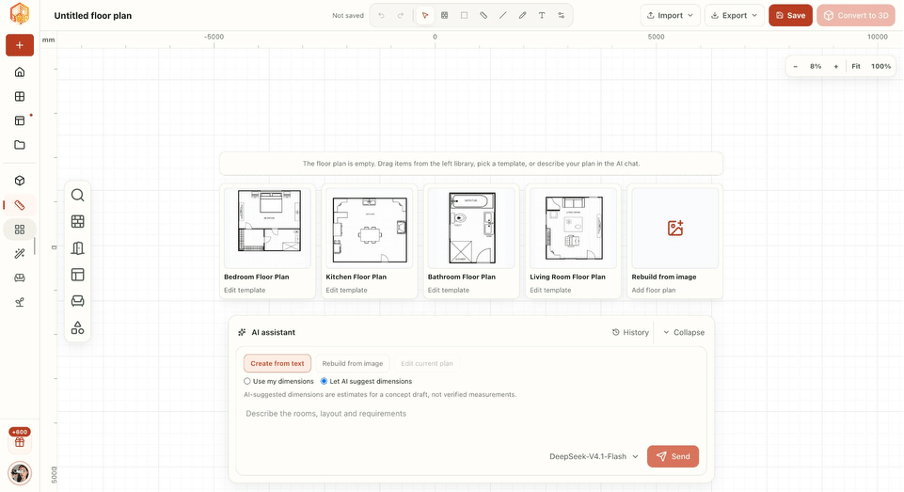
The workbench: a scaled grid, a template library and an AI assistant in the same window.
1. Set scale and wall thickness before your first line
Decide what one grid square means — one foot, or half a metre — and never mix units in one drawing. Then set wall thickness, the number everyone forgets: interior partitions run 4–6 inches (100–150 mm), exterior walls 8–12 inches (200–300 mm) depending on insulation and cladding.
A wall drawn as a single line becomes ten inches of reality. Your ten-foot bedroom is suddenly 9’2″ clear, and the wardrobe you measured no longer fits. Dimension rooms to the inside face and subtract wall thickness — any free online floor plan creator worth the tab does that arithmetic for you.
2. Draw in the right order: envelope, partitions, openings, fixtures
Overall envelope at true outside dimensions first. Then interior walls. Then doors and windows. Furniture last, always.
Furniture-first is the most common failure. You place a sofa, a bed, a table — everything looks lovely — then the door has nowhere to swing and the hallway is thirty inches wide. The plan isn’t wrong; it was drawn backwards. In a free online floor plan creator, the drawing order matters more than the tool you picked.
3. Openings carry the logic of the whole plan
- Passages: 30 in minimum, 32 in for bedrooms, 36 in if anyone in the house may age in place.
- Entry doors: 36 in. Anything narrower is a moving-day regret.
- Swing: doors swing into the room they serve — never into a closet or a corridor.
- Egress: bedroom windows need roughly 5.7 sq ft of clear opening, at least 20 in wide and 24 in high, sill no higher than 44 in.
Draw openings as gaps with a swing arc, not as a symbol floating on a wall. The arc tells you the truth about the room — and it is where most floor plan creator drafts quietly go wrong, because a symbol is easy to place and an arc is not.
4. Run the clearance numbers, not your instincts
These figures decide whether a plan is livable:
| Space | Minimum | Comfortable |
| Beside a bed | 24 in | 30 in |
| Foot of the bed | 30 in | 36 in |
| Kitchen work aisle | 36 in | 42 in |
| Behind a dining chair | 30 in | 36 in |
| Hallway | 36 in | 42 in |
| Toilet, centre to side wall | 15 in | 18 in |
If a dimension fails, move a wall — don’t shrink the number. Shrunk numbers are how “it fit on paper” becomes “we can’t open the dishwasher”. Run the same figures inside your floor plan creator, and for a kitchen remodel keep 42 inches clear between the counter run and the island.
5. Use templates and AI drafts as scaffolding, not as answers
A blank canvas is where most projects stall. Start from a proven layout instead — bedroom, kitchen, bathroom and living room templates already encode the clearances above, so you are editing a working plan instead of inventing one.
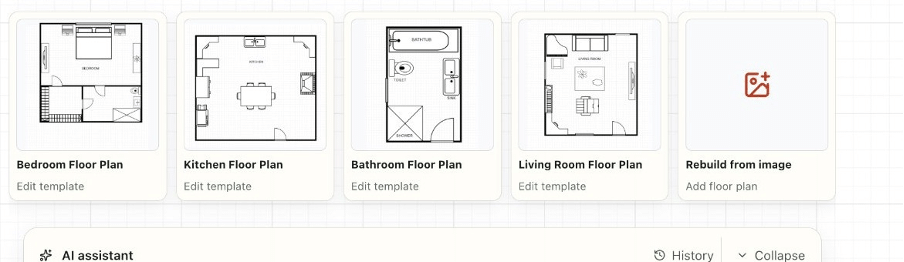
Four room templates, each already drawn to scale — plus a rebuild-from-image shortcut for plans that only exist as a scan.
When you need something custom, describe it: “two bedrooms, one bath, open kitchen with an island, 900 sq ft” is enough for an AI floor plan creator to produce a first draft you can drag into shape. Same for a plan you only have as a photo — upload the image, rebuild it, then correct every dimension by hand.
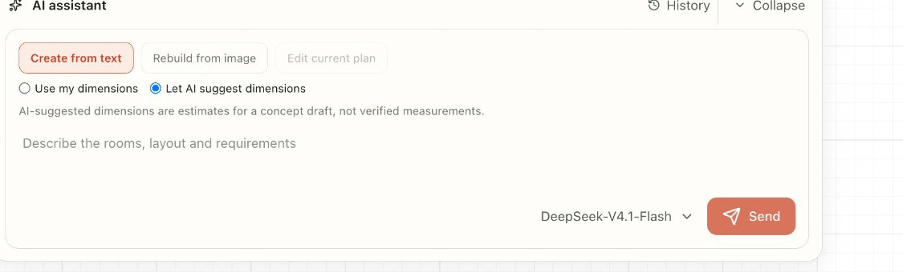
Create from text, rebuild from an image, or edit the current plan — with a deliberate switch between “use my dimensions” and AI-suggested ones.
Two rules keep this honest:
- Treat the first draft as a hypothesis. Move walls, test the aisles, delete the corridor nobody needs.
- Verify every dimension. AI-suggested dimensions are estimates for a concept draft, not measurements. Measure the real space first — three checks per room, corner to corner — before anything gets priced.
That is the difference between using a floor plan creator and being used by one.
What “free” actually covers
Almost every free online floor plan creator produces a scaled, dimensioned draft, so price is a poor way to choose between them. The differences appear after the draft: can you edit dimensions directly, is a 3D preview included, and is the export a clean dimensioned plan or a screenshot with a watermark across it?
So ask the question that matters. Is a floor plan creator free plan good enough for real work? For a sketch you want to show a partner or a contractor before spending money — yes; stop reading reviews and start drawing. For anything that will be priced, listed or built, test the export on day one. The floor plan creator free of charge still exports real dimensions, and the file format decides whether your builder can use them.
Real estate listings are the other common case: a 3D floor plan creator lets buyers walk a photo set in their heads before they book a viewing.
6. Pressure-test before you hand the drawing to anyone
- Switch to 3D. Volume, ceiling height and sightlines expose what a 2D drawing hides — a beam that cuts a room in half, a window that stares at a wall.
- Add up the numbers. Room widths plus wall thicknesses must equal the overall dimension; if they don’t, something drifted off-grid.
- Walk the route. Front door to kitchen to bathroom, in your head, carrying a laundry basket.
- Print and export. Builders read paper, not screens — whatever free online floor plan creator you used, the plan has to leave the app as a dimensioned PDF or image, not a screenshot.
The mistakes that cost the most
- Hairline walls, then surprise at the eight-inch reality.
- Doors that swing into closets.
- An interior bathroom with no window and no borrowed light.
- Measuring the old room to its outside face, then drawing to the inside face.
- Skipping the 3D check because the 2D view looked fine.
Bottom line
A floor plan creator takes you from idea to a drawing in an afternoon. The drawing becomes a plan only when the numbers are real: wall thickness, door widths, clearances, one verified site measurement. Get those four right and your sketch survives contact with a contractor — the only test that matters.