From a Still Picture to a Moving Story: A Practical Guide to Image Animation
A photograph can capture a moment, but movement can reveal more about its atmosphere, emotion, or setting. Imagine a picture of a sailboat on a quiet lake. With subtle animation, the water might ripple, the boat could drift gently, and clouds might move across the sky. These small changes can make a familiar scene feel more engaging without requiring an entirely new video shoot.
An ai image to video generator free option can help creators experiment with this process by turning a still image into a short moving sequence. The challenge is not simply making something move. It is deciding which movements improve the story, which details should remain unchanged, and how to produce a result that feels believable.
Start by Finding the Motion Hidden in the Image
Before choosing a tool, examine the image as if you were planning a short film. Every picture contains clues about possible movement, even when nothing is actually moving. A landscape might suggest drifting clouds or swaying grass. A portrait could benefit from a subtle camera push-in, while a picture of a busy street might suit gentle movement in the background. The most convincing animation usually begins with an action that naturally belongs in the scene.
Try describing the intended movement in one sentence. For example: “The camera slowly moves toward the old wooden cabin while leaves shift gently in the breeze.” This sentence establishes a clear direction. It also prevents the animation from becoming a collection of unrelated movements that distract from the original subject.
Select an Image That Can Support Animation
Not every image is equally suitable for conversion into video. A clear subject, understandable background, and reasonable separation between objects can make it easier to create a coherent sequence. Look for these characteristics when selecting an image:
- A recognizable focal point: Viewers should quickly understand what the scene is about.
- Room for movement: Open skies, water, roads, and spacious backgrounds can offer natural opportunities for animation.
- Consistent visual details: Clear edges and well-defined objects may help reduce distracting changes between frames.
- A suitable composition: The image should leave enough room for the planned movement without cutting off important details.
Images with overlapping objects, complicated patterns, or several interacting people can be more difficult to animate convincingly. They are not necessarily unusable, but they may require more experimentation.
Compare Free Options Before Committing
An ai video generator from image can be useful for social media clips, creative experiments, product concepts, or simple storytelling. However, free access does not always mean unlimited generation or unrestricted downloads. Some services may limit the number of credits, the length of each clip, the available resolution, or access to particular features. Others may place restrictions on commercial use or include watermarks.
Before investing time in a project, check the current terms and test a small example. Consider whether the tool offers sufficient control over motion, whether its results fit your intended format, and whether you can export the finished clip in a usable way. It is also worth checking how uploaded images are handled. If a picture contains personal information, private material, or someone else’s work, review the relevant privacy and usage policies before submitting it.
Give the Animation One Clear Direction
A common mistake is requesting too much movement at once. If a prompt asks for a person to turn, wave, walk, smile, and interact with several objects in a short clip, the result may become inconsistent. A more reliable approach is to prioritize one main action and add only supporting movement where it makes sense.
For instance, a photograph of a person standing beside a window could be animated with a slow camera movement and curtains shifting slightly in the breeze. The person’s position can remain stable while the environment creates a sense of life. When writing the motion description, consider three questions:
- What should move first?
- How fast should the movement feel?
- Which parts of the image should remain stable?
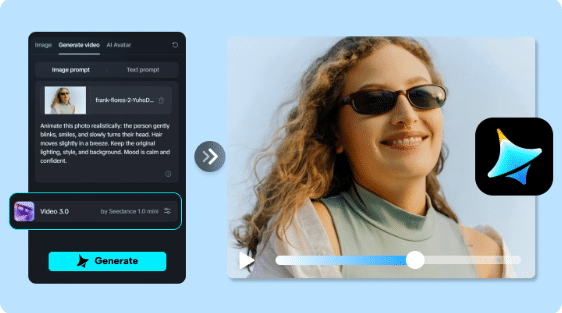
Creators who want to explore image-based animation can use Dreamina to experiment with visual ideas and investigate how different motion descriptions affect the result.
Judge the Result by Its Continuity
A video may look impressive in its opening moment but become distracting when viewed from beginning to end. Watch the entire clip rather than judging it from a single frame. Pay attention to whether objects retain their shape, whether movement follows a believable direction, and whether the background changes unexpectedly. Faces, hands, text, and thin structures deserve particular attention because distortions in these areas can become noticeable during motion.
Also consider the pace when using an ai video generator from image. A slow, atmospheric scene may lose its intended mood if everything moves too quickly. Conversely, a promotional clip might feel lifeless if the animation is barely perceptible. If the result has one obvious problem, adjust the instructions around that issue and try again. Replacing the whole description after every attempt makes it harder to identify which change actually helped.
Make the Final Clip Fit Its Destination
Once the movement looks acceptable, review the video in the context where it will appear. A vertical clip for a mobile feed has different framing needs from a wide video intended for a presentation. Check the opening and closing moments, the overall duration, and any space needed for captions or additional graphics. If the video supports an educational explanation, ensure the movement reinforces the subject rather than competing with it. For a creative post, consistency between the image’s original mood and the animation can be more important than complexity.
A final human review is valuable even when the generated motion appears smooth. Correct obvious visual errors, confirm that the clip communicates the intended idea, and make sure you have the necessary rights to use the source image.
Final Thoughts
Turning a still image into a moving sequence is most effective when the animation serves a clear purpose. Choosing a suitable picture, planning a small number of natural movements, and reviewing continuity can improve the final result without making the process unnecessarily complicated. Free tools provide a convenient starting point, but their limits and usage conditions should be checked before they become part of a larger workflow. With careful direction and thoughtful editing, a single image can become the beginning of a compelling visual story.
Frequently Asked Questions
What does an AI image-to-video generator do?
It uses an image as the visual starting point for creating a moving clip. Depending on the tool, users may also provide text instructions to guide camera movement, environmental effects, or subject motion.
Can I convert an image into a video for free?
Some services provide free credits or limited access to image animation. Availability, export options, clip duration, and watermarks vary, so check the current conditions of the service you choose.
Which images work best for animation?
Images with a clear subject, readable composition, and enough space for natural movement are often good starting points. Simple scenes can be easier to animate consistently than crowded images with many overlapping details.
Why does an animated image sometimes look distorted?
The system has to estimate how a still scene might change across multiple frames. This can lead to inconsistent shapes, facial details, object boundaries, or background elements, especially when the requested movement is complicated.
Can an image-generated video be used commercially?
Potentially, but commercial use depends on the tool’s terms, the source image’s rights, and applicable laws. Review the relevant permissions before publishing or selling the resulting video.