SkyTab Kiosk: When Restaurants Should Add Self-Service Ordering
The line is backed up to the door. SkyTab Kiosk is what a growing number of counter-service operators are deploying in 2026 to break that bottleneck — a self-ordering terminal that plugs directly into Shift4’s cloud POS and handles the full guest checkout flow without a cashier in the loop. Does every restaurant need one? No. But if you’re running a QSR or fast-casual concept where the front counter is your biggest chokepoint, the math on adding self-service deserves a hard look.
The Real Problem: Your Counter Is Costing You Money
Here’s the situation I keep seeing. A restaurant does solid volume during lunch. The kitchen isn’t the problem — ticket times are fine. The bottleneck is the three people standing at the register taking orders, answering questions about allergens, and fumbling with split payments. Labor is tied up on data entry, not hospitality.
But it tracks with what operators report: fewer people waiting, faster throughput, and cashiers freed up for food running and table touches.
The adoption signal is clear too.
What SkyTab Kiosk Actually Does (Operationally)
Skip the marketing summary. Here’s what the system does in a shift:
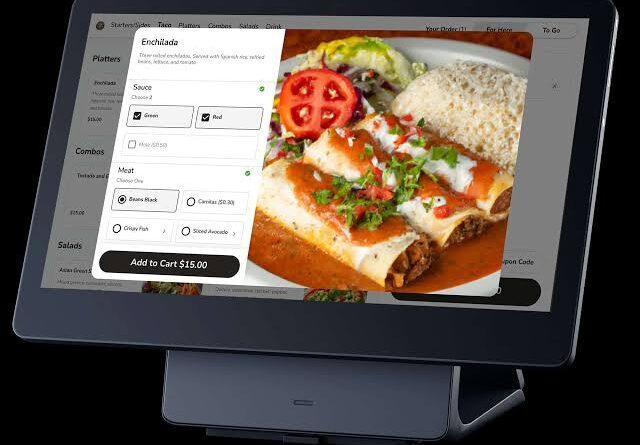
- Digital menu display — the kiosk renders your current menu, including modifiers, combos, and time-based pricing, pulled from the same cloud POS database your registers use. Menu update on the POS? It propagates to the kiosk.
- Guest-directed checkout flow — the guest builds the order, confirms modifiers, and pays at the terminal. No cashier required to relay the order to the kitchen.
- Integrated payment processing — Shift4 handles the payment layer, so you’re not duct-taping a third-party terminal onto the kiosk. One settlement, one reporting stack.
- Upsell prompts — the system can surface suggested add-ons at checkout (drink with that? larger size?), triggered by what’s in the cart, not by whether a cashier remembers to ask.
- Order accuracy routing — the order fires directly to the kitchen display system, bypassing the transcription step where most errors live.
During a breakfast rush, a guest walks up, taps through a customized sandwich build with three modifier swaps, pays by tap-to-pay, and the ticket hits the KDS — without a staff member re-entering the order. The result should be measured during a pilot rather than assumed from a demonstration without a staff member involved. That’s the operational win.
When It Makes Sense to Deploy (And When It Doesn’t)
Deploy a kiosk if:
- Your peak-hour register queue regularly exceeds 4–5 people
- You’re running counter service, QSR, or fast-casual with a high-volume daypart
- Your staff is spending more than 30% of shift time on order entry rather than food prep or guest interaction
- Your average check is modifier-heavy (customization slows down cashiers significantly)
- You’re already on SkyTab POS — integration is native, not a workaround
Don’t deploy a kiosk if you’re running a full-service dining room where the cashier interaction is part of the hospitality model. Kiosks solve a throughput problem, not a hospitality problem. Pushing a fine-dining guest to a self-service terminal is the wrong move.
Where Implementations Break Down
I’ve watched operators buy kiosks and then underuse them — or worse, create new problems. The failure modes are predictable.
Menu not maintained. The kiosk pulls from the POS menu database. If your modifiers are a mess in the back end — duplicate items, orphaned modifiers, inconsistent pricing — the kiosk will surface that chaos to guests. Fix the menu architecture before you go live.
No fallback for payment failures. Edge case, but it happens: a guest’s card declines at the kiosk, they don’t have another form of payment, and there’s no cashier nearby. Always keep at least one staffed register active during kiosk operation. Don’t go fully unattended unless your volume and layout support it.
Check these before launch:
- Network connectivity — kiosk on a stable wired or dedicated WiFi connection, not shared with guest WiFi
- Menu audit — all modifiers mapped, 86’d items removed or marked unavailable
- Payment terminal firmware — confirm it’s current before opening day
- KDS routing — verify kiosk orders are routing to the correct kitchen stations, not defaulting to register queue
- Staff positioning — someone should be visible near the kiosk for the first few weeks to catch guest confusion
Delayed deposits are another edge case worth flagging. If the kiosk goes offline mid-shift and processes in offline mode, those transactions need to reconcile cleanly when connectivity restores. Verify your offline fallback settings with your Shift4 partner before go-live.
The Average Check Question
Operators often ask: does a kiosk actually increase average ticket? The honest answer is — it can, but it depends on how you configure the upsell logic.
A cashier who’s managing a line of eight people isn’t going to suggestively sell on every transaction. The kiosk doesn’t get tired. Every single order gets the same upsell prompt, every time, configured exactly how you want it. If your drink attachment rate is low because cashiers forget to ask, that’s a recoverable number with a kiosk in the flow.
Your actual result depends on deployment quality, menu configuration, and how you redeploy the labor you free up.
Integration With Your Existing POS Stack
This is where Shift4’s architecture actually earns its keep. The kiosk isn’t a standalone appliance — it runs on the same cloud POS layer as your registers. That means no manual menu syncing, no separate reporting portal, no third-party middleware eating into your margin.
If you’re evaluating this for a counter-service or QSR concept, the tightest path is to run the kiosk alongside a quick-service restaurant POS built on the same Shift4 platform — one system, one settlement, one place to pull your end-of-day numbers. Operators who try to bolt a kiosk from one vendor onto a POS from another vendor typically spend months debugging integration issues that shouldn’t exist in the first place.
The reality is that kiosk ROI lives or dies on how cleanly the order data flows. If the kiosk fires to the kitchen accurately and the payment settles cleanly in your existing batch, you’ve won. If there’s a seam in the integration — a middleware layer, a manual reconciliation step, a separate reporting dashboard — that seam will cost you time every single day.
Practical Rollout Advice
Start with one kiosk. Not two, not a full bank. One terminal, positioned at the end of your existing counter flow so guests can choose — register or kiosk. Watch what percentage of guests self-select to the kiosk over the first two weeks. If that number climbs, add hardware. If guests are avoiding it, find out why before scaling.
Train your staff to direct, not to take over. If a staff member steps in and completes the order for every confused guest, you’ve just created an expensive kiosk-shaped cashier station. The goal is guest confidence at the terminal. That takes a few weeks of soft coaching, not a permanent workaround.
At 9pm close, run your kiosk transaction log against your register totals before you lock up. Discrepancies are easier to trace same-day. A void that happened at 2pm and doesn’t surface until weekly reconciliation is a pain to unwind.
The operators who get the most out of self-service ordering are the ones who treat the kiosk as a front-of-house workflow change — not just a hardware install. Reposition your staff, reconfigure your floor, and watch your throughput numbers over 30 days. That’s when you’ll know whether you need more terminals or just better menu architecture.