Video Background Remover: How to Remove Background from Videos Automatically
Video content has become a key part of online communication. From social media and online courses to business presentations and product demonstrations, videos help people connect with audiences in a more engaging way than static images. However, not every video is recorded in a professional environment. A cluttered room, an office filled with distractions, or a crowded outdoor location can reduce the impact of an otherwise excellent video.
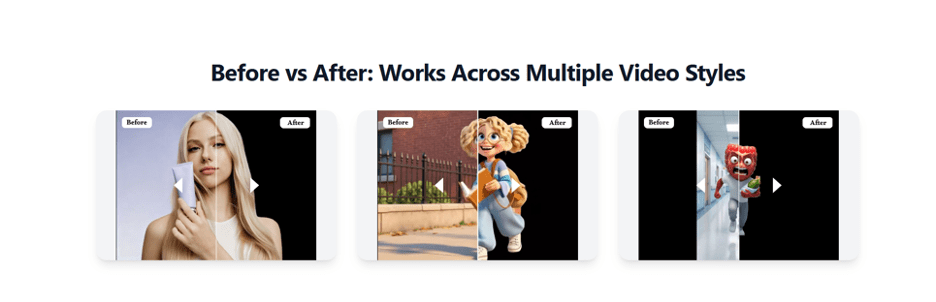
Fortunately, artificial intelligence has made video editing easier than ever. A modern Video Background Remover can automatically detect the subject in a video and separate it from the surrounding environment. This allows users to Remove Background from Video without relying on expensive software, advanced editing skills, or a traditional green screen.
Whether you’re creating marketing content, educational videos, or social media posts, AI-powered background removal can help you achieve cleaner and more professional results in a fraction of the time.
Why Video Backgrounds Influence Viewer Engagement
The background of a video plays a bigger role than many creators realize. A messy or distracting environment can pull attention away from the speaker or product, making it harder for viewers to focus on the message.
Replacing or removing the background creates a cleaner viewing experience. Businesses can use branded visuals, educators can choose distraction-free settings, and content creators can match backgrounds to their personal style or campaign theme.
A polished background not only improves the appearance of the video but also helps build credibility and professionalism.
The Evolution from Green Screens to AI
For many years, green screens were the standard solution for changing video backgrounds. While effective, they required dedicated equipment, controlled lighting, and careful editing after filming. Artificial intelligence has transformed this process.
Instead of identifying a green color, AI recognizes people, objects, and movement throughout the video. The software analyzes each frame, separates the subject from the background, and creates a clean cutout automatically. This allows creators to film almost anywhere while still producing videos with professional-looking backgrounds.
As AI models continue to improve, background removal has become faster, more accurate, and much easier for beginners.
Where AI Video Background Removal Is Most Useful
The ability to edit video backgrounds has applications across many industries. Businesses can create polished promotional videos without renting a studio. Teachers can record lessons from home while presenting a clean classroom environment. Real estate professionals can enhance property walkthroughs by removing distractions from the background.
Social media creators often replace ordinary surroundings with visually appealing scenes that better match their content style. Even freelancers and remote workers use AI to improve client presentations and recorded webinars. Because the editing process is automated, users spend less time on technical adjustments and more time creating valuable content.
How the AI Editing Process Works
Using a Video Background Remover is surprisingly simple. Most AI-powered platforms follow a similar workflow:
- Upload your video.
- The AI automatically identifies the main subject.
- The original background is removed.
- Choose a transparent background, a solid color, or upload a new background image or video.
- Export the finished project in your preferred format.
Since the software handles subject detection automatically, users rarely need to perform detailed manual editing.
This streamlined workflow is one of the biggest reasons AI video editing has become so popular.
Tips for Better Background Removal Results
Although AI performs most of the work automatically, recording quality still affects the final outcome.
To achieve cleaner results:
- Record in a well-lit environment.
- Keep the camera as steady as possible.
- Maintain good contrast between the subject and the background.
- Avoid extremely crowded or fast-moving backgrounds.
- Use high-resolution video whenever possible.
These simple practices allow the AI to identify the subject more accurately and produce smoother edges throughout the video.
Advantages for Businesses and Content Creators
AI-powered background removal offers more than visual improvements. It also creates a more efficient production workflow.
Some of the biggest benefits include:
- Faster video editing without complex software.
- Lower production costs compared to studio filming.
- Professional-looking content for websites and social media.
- Consistent branding across marketing campaigns.
- Greater flexibility when updating promotional materials.
These advantages help businesses publish content more frequently while maintaining high production standards.
Choosing the Right Video Background Remover
Not every AI platform delivers the same quality. When selecting a Video Background Remover, it’s worth considering several important factors. Look for software that accurately follows the subject throughout the video, preserves fine details like hair and clothing, and exports videos in high resolution.
Fast rendering speeds and an easy-to-use interface are also valuable, especially for creators producing videos on a regular basis. Testing a few sample videos before committing to a platform can help identify which tool best fits your workflow.
The Future of AI Video Editing
Artificial intelligence continues to reshape the creative industry by automating complex editing tasks.
Future background removal tools are expected to deliver even more accurate subject tracking, smoother edge detection, and better handling of fast movement. AI will also become more deeply integrated with features such as automatic subtitles, voice enhancement, scene generation, and intelligent video editing.
As these technologies evolve, professional-quality video production will become even more accessible to businesses, educators, marketers, and independent creators. The gap between beginner-friendly tools and professional editing software will continue to narrow.
Conclusion
A Video Background Remover has changed the way videos are edited by making background removal simple, fast, and accessible. Instead of relying on green screens and complicated editing techniques, users can now Remove Background from Video automatically with the help of AI.
Whether you’re producing business presentations, educational tutorials, marketing campaigns, or social media content, AI-powered background removal helps create cleaner visuals while reducing editing time. As artificial intelligence continues to improve, these tools will become an essential part of modern video production, allowing creators of all experience levels to produce polished, professional videos with greater efficiency.