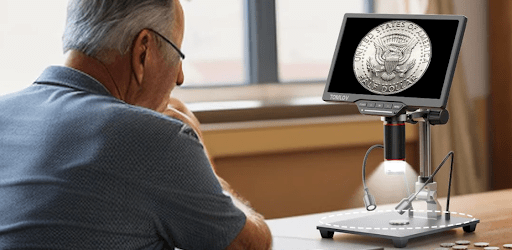
How to Build a Professional Coin Archive System with a Digital Coin Microscope
If you’ve been collecting coins for any length of time, you already know that the real challenge isn’t finding interesting pieces — it’s keeping track of them. A coin stuffed in a cardboard flip with a handwritten label is fine when your collection is twenty pieces. When it grows to two hundred, or two thousand, that approach starts to cost you real money.
A proper coin archive isn’t just about organization. It’s about documentation that holds up under scrutiny — at an estate sale, during an insurance appraisal, or when a potential buyer asks for provenance. Here’s how to build an archive system that actually works.
Why Documentation Is Where Most Collectors Fall Short
Collectors spend enormous energy on acquisition and grading, then almost nothing on systematic documentation. The result is a collection that only they understand — and sometimes not even that. Surface conditions change over time, memories fade, and market context gets lost.
A well-built archive solves three problems at once: it protects your investment, it makes individual coins easier to evaluate and sell, and it creates a historical record that adds genuine provenance value to significant pieces. The microscope is what transforms this from a spreadsheet exercise into something visually authoritative.
Step 1: Establish a Consistent Shooting Protocol
Before you photograph a single coin, decide on your standards and stick to them. Consistency is what makes an archive useful — if every coin is photographed under different conditions, the images can’t be meaningfully compared over time.
Set your digital microscope to the same magnification for your standard overview shot (50x to 100x works well for most coins), then use a higher magnification — 200x to 500x — for detail captures of the obverse, reverse, edge, and any areas of interest. Mark these positions if your microscope has memory presets.
Lighting matters enormously. Angled LED illumination at around 45 degrees picks up surface texture and reveals hairlines that flat lighting will completely hide. If your microscope has adjustable LED rings, experiment with partially blocking sections to create directional light that models the coin’s relief.
Step 2: Capture the Images That Actually Matter
For each coin, you want a minimum of five images: full obverse, full reverse, edge (rotated in a full pass if you can), a high-magnification detail of the highest-relief design element, and a detail of the field near the rim where contact marks most often appear.
For proof coins and key dates, add more. Document any die varieties you’ve identified, any cleaning evidence, any areas of original luster. These close-up captures are what a grading service or experienced buyer will actually look at — and with a good digital microscope, your images can be just as revealing as anything a professional grader would see through their own loupe.
Save every image in its original resolution. Don’t compress for storage. Drive space is cheap; image quality lost to compression is gone permanently.
Step 3: Build Your Archive Database Around the Images
A database without images is a list. Images without a database are a folder full of files you’ll never find again. The system only works when both are linked.
Your database entry for each coin should include a unique ID number (use this in your file naming convention), date of acquisition, source, purchase price, current estimated value and date of that estimate, grade (your own assessment and any third-party grade), variety attribution, storage location, and condition notes with dates. That last point is important — if you add a note that says “light obverse hairlines visible at 300x” without a date, it’s useless. With a date, it becomes a condition record you can compare against future images.
Free tools like Numista have built-in collection tracking. Paid options like Coin Manage or PCGS CoinFacts Pro offer more robust documentation features. Serious collectors sometimes maintain a custom spreadsheet simply because it gives them complete control. Whatever you choose, the microscope images are what give it teeth.
Step 4: Use Your Microscope to Document Condition Changes Over Time
This is the part most collectors never think about until it’s too late. Coins change. Toning develops. Storage problems cause spotting. PVC residue from cheap holders migrates onto surfaces. A coin that was MS-63 quality when you bought it might look worse five years later if it was improperly stored.
By photographing your coins at acquisition and then annually — or whenever you handle them significantly — you create a condition timeline. If a coin that looked clean starts showing haze in the fields, you’ll catch it early. If a naturally toning coin is developing attractive color, you have documentation that it’s original rather than artificially treated.
This kind of longitudinal documentation also protects you legally and ethically when selling. You can show a buyer exactly what they’re getting and demonstrate that it hasn’t changed on your watch.
Step 5: Organize Your Archive for Retrieval, Not Just Storage
An archive you can’t quickly search is almost as useless as no archive at all. Name your image files systematically, incorporating the coin’s unique ID, year, denomination, mint mark, side, and magnification level — so every file is self-describing without even opening it.
Organize your folder structure by series or type, not by acquisition date. You want to be able to pull up everything you know about your Morgan dollars in one place, not hunt across five years of folders.
Back up everything, and back it up off-site. Cloud storage for the database and images, plus a local external drive, is the minimum. A collection worth thousands of dollars deserves storage infrastructure worth a few dollars a month.
Choosing the Right Coin Microscope for an Archiving Workflow
Not every microscope suits this kind of systematic work equally well. For archiving, you want a few specific things: consistent repeatability (so images taken months apart are comparable), photo and video capture capability, sufficient resolution to reveal surface detail that matters for grading, and a stable, vibration-free stand that doesn’t shift between shots.
A magnification range of at least 10x–1200x gives you both the overview shots and the close detail captures in a single tool. An LCD screen lets you compose shots carefully rather than squinting through an eyepiece. HDMI output becomes valuable when you want to show documentation to another collector, at a club meeting, or during a sale negotiation. If you’re looking for a dedicated tool built around exactly this kind of workflow, a purpose-built coin microscope with adjustable LED lighting and built-in image capture will serve you far better than a general-purpose magnifier.
Final Thoughts
Building a coin archive is slow work done correctly, and that’s the point. Every hour you spend now documenting what you own pays dividends when you sell, insure, or pass on your collection. The coins are the investment; the documentation is what protects it.
Start with your ten most valuable coins. Build the habit. Then work backward through the rest of the collection at whatever pace suits you. A year from now, you’ll have something worth having.