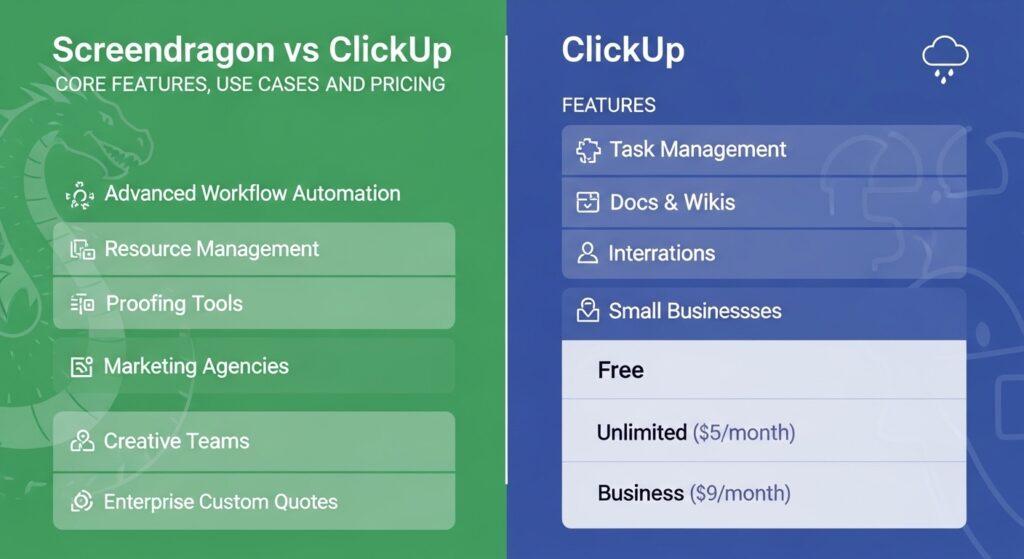
Screendragon vs ClickUp Comparison: Core Features, Use Cases and Pricing
Marketing Resource Management tools aren’t just nice-to-haves any more. For marketing and agency teams, they’re the engine behind efficiency, collaboration, and — ultimately — results. The right platform keeps campaigns on track, resources visible, and approvals moving. The wrong one creates more admin than it solves.
This comparison looks at two platforms that approach the problem differently: Screendragon and ClickUp. One is built specifically for marketing and agency operations. The other is a flexible, general-purpose tool used across industries. Both have strengths. The question is which one fits the way your team actually works.
Introduction to Modern Marketing Resource Management Tools
Marketing Resource Management software has come a long way from shared spreadsheets and email chains. Today’s platforms offer workflow automation, resource management, AI-driven assistance, and advanced reporting — all in one place.
For marketing and agency teams, the bar is higher. You’re not just tracking tasks. You’re managing multi-client workloads, layered approval chains, creative production cycles, and profitability — often simultaneously. The project and portfolio management (PPM) market reflects this demand, with projections suggesting it could reach $13.7 billion by 2029 at an 11.9% CAGR (Markets and Markets).
That growth means more options. But more options doesn’t mean every tool is built for the same job.
Screendragon Overview — Designed for Marketing and Agencies
Screendragon positions itself not as a generic PM tool, but as a platform designed around the realities of marketing and agency operations. It connects planning, people, and profitability in one system.
Marketing Resource Management
Screendragon centralises projects, campaigns, and briefs in a single marketing resource management platform. Content creation, approvals, and deadlines are tracked end-to-end — so nothing falls between the cracks when you’re running multiple campaigns at once.
Agency and Enterprise Workflow
Resource allocation is optimised across multiple projects, with real-time visibility into workload, deadlines, and project profitability. For agencies juggling dozens of clients, this is where generic tools often fall short.
AI Agents
Screendragon’s AI agents act as intelligent assistants that automate repetitive tasks — briefing, proofing, compliance checks. The goal: reduce errors and free up time for strategic, creative work. These aren’t fully autonomous systems; they’re human-in-the-loop tools designed to support teams, not replace them.
Workflow Automation
Approvals and feedback loops are streamlined through step-by-step process automation. For creative workflows with multiple review stages, this helps eliminate bottlenecks and keeps work moving.
Reporting and Analytics
Detailed dashboards cover efficiency, workload, and ROI. Profitability tracking works at the project, client, or department level — useful for agencies that need to understand margin, not just output.
Resourcing
AI-powered smart auto-assignment, live capacity views (by hour, percentage, or task), and AI-driven forecasts help teams spot resource gaps before they become problems.
Use Cases for Screendragon
→ Multi-client agencies managing complex creative production across accounts
→ In-house marketing teams running repetitive, high-volume campaigns
→ Enterprise brand teams with layered approval workflows and compliance requirements
→ Operations leads who need profitability visibility alongside project tracking
Screendragon’s value is clearest when the work is marketing-specific, multi-layered, and needs more than task management — it needs operational control.
ClickUp Overview — Flexible Project Management for All Teams
ClickUp takes a different approach. It’s a broad, flexible platform designed to work for virtually any team — from engineering to HR to marketing. With over 20 million users reported worldwide, it’s one of the most widely adopted tools on the market.
Task Management
ClickUp uses a hierarchical structure — Spaces, Folders, Lists, Tasks, Subtasks — that lets teams organise work in whatever way makes sense. Custom fields, statuses, and priorities add flexibility.
Multiple Project Views
ClickUp offers 15+ customisable view types, including List, Kanban Board, Gantt, Calendar, Table, Workload, Whiteboards, Mind Maps, and Portfolios. Teams can switch between views depending on the work.
Integrations and Automation
With over 1,000 integrations via native connections and Zapier, ClickUp connects to most tools teams already use. Built-in automation recipes handle routine actions like status changes, assignments, and notifications.
Collaboration Tools
Real-time documents, whiteboards, threaded comments, and in-app chat keep communication inside the platform.
Reporting
ClickUp provides dashboards with widgets for tracking progress, time, workload, and custom metrics. Reporting is flexible but more general-purpose than marketing-specific.
Use Cases for ClickUp
→ Small-to-mid teams needing a flexible, affordable task management tool
→ Cross-departmental teams that want one platform for varied work types
→ Startups scaling fast and needing a tool that adapts as they grow
→ Marketing teams with straightforward campaign tracking needs
Feature Comparison Table — Screendragon vs ClickUp
| Feature | Screendragon | ClickUp |
|---|---|---|
| Target Users | Marketing teams, agencies, enterprise brand ops | All teams — engineering, marketing, HR, product, and more |
| Focus | Marketing work management, agency operations | General-purpose project and task management |
| AI & Automation | AI agents for briefing, proofing, compliance; step-by-step workflow automation | Built-in automation recipes; Brain AI add-on for writing and summarisation |
| Resource Management | AI-powered auto-assignment, live capacity views, forecasting, profitability tracking | Workload view with capacity tracking; less depth on profitability |
| Workflow Complexity | Built for multi-stage creative approvals, layered review cycles, compliance gates | Flexible workflows via custom statuses and automations; less structured for complex approval chains |
| Reporting & Analytics | Marketing-specific dashboards — efficiency, ROI, profitability by project/client/department | General dashboards with customisable widgets; broad but less marketing-specific |
| Integrations | Pegasus, MS Dynamics, PeopleSoft, Office 365, Slack, Google Drive, Power BI, DAMs, CMSs | 1,000+ integrations via native connections and Zapier |
Summary: Screendragon goes deeper on marketing-specific workflows, resource management, and profitability. ClickUp goes wider — more views, more integrations, more flexibility across team types. The trade-off is depth vs breadth.
Pricing — Screendragon vs ClickUp
Screendragon uses enterprise-focused custom pricing. Plans are based on team size, workflow complexity, and feature requirements. Pricing is available via consultation and demo.
ClickUp offers tiered pricing:
→ Free Forever — basic features, unlimited tasks
→ Unlimited — $7/user/month
→ Business — $12/user/month
→ Enterprise — custom pricing
→ Brain AI add-on — $9/user/month
ClickUp’s tiered model suits teams that want to start small and scale. However, it’s worth noting that some reviewers flag advanced features — like conditional logic in forms — as locked behind the Enterprise tier. Screendragon’s custom model is better suited to larger teams that need tailored configuration from the start.
Strengths and Weaknesses
Screendragon Strengths
→ Purpose-built for marketing and agency workflows — not retrofitted
→ AI agents that automate briefing, proofing, and compliance tasks
→ Deep resource management with AI-driven forecasting and profitability tracking
→ Structured approval workflows designed for multi-stage creative review
Screendragon Weaknesses
→ Enterprise pricing may not suit very small teams or early-stage startups
→ Narrower integration ecosystem compared to ClickUp’s 1,000+ connections
→ Steeper onboarding curve for teams outside marketing/agency use cases
ClickUp Strengths
→ Affordable entry point with a free tier and competitive per-user pricing
→ Highly flexible — adapts to nearly any team or workflow type
→ 15+ project views and 1,000+ integrations
→ Large, active user community (reported 20 million+ users)
ClickUp Weaknesses
→ Performance speed is a recurring concern — 53% of Software Advice reviewers cite slowness, loading delays, or bugs
→ Mobile experience rated negatively by 31% of reviewers — citing clunky design, limited functionality, and sync issues
→ Advanced features gated behind higher pricing tiers, which can push costs up as teams grow
Practical Scenarios — When to Choose Screendragon or ClickUp
Scenario 1: Marketing Agency Handling Multiple Clients
You’re running creative production across 15+ accounts. Each client has different approval chains, brand guidelines, and reporting needs. You need resource visibility across all of them.
→ Screendragon. Its agency-specific workflow automation, profitability tracking, and AI-powered resourcing are built for exactly this kind of complexity.
Scenario 2: Small Team Needing Flexible Task Management
You’re a team of 10. You need a tool that handles task tracking, basic timelines, and team collaboration — without a long setup process or enterprise pricing.
→ ClickUp. The free tier gets you started, and the flexible structure adapts as your needs evolve.
Scenario 3: In-house Marketing Team with Repetitive Campaigns
You run the same campaign types quarterly — email sequences, social pushes, content calendars. Each cycle involves the same approval steps, the same stakeholders, the same bottlenecks.
→ Screendragon. Workflow automation and AI agents can templatise and streamline those repeating cycles, reducing manual effort each time.
Scenario 4: Cross-Departmental Project Management
You need one tool for marketing, product, and operations. The work varies widely — some teams need Kanban boards, others need Gantt charts, others just need a task list.
→ ClickUp. Its breadth of views and general-purpose flexibility make it easier to serve varied teams under one roof. If the marketing team’s needs are complex enough, though, it may be worth running Screendragon alongside a general-purpose tool.
Conclusion
Screendragon and ClickUp solve different problems well.
Choose Screendragon if your team is in marketing or agency operations and you need AI-enhanced workflow automation, deep resource management, profitability tracking, and structured approval workflows. It’s built for the complexity that marketing work actually involves.
Choose ClickUp if your team needs flexibility, affordability, and broad task management across varied work types. It’s a strong general-purpose tool — especially for smaller teams or organisations where marketing is one function among many.
The real question isn’t which tool has more features. It’s whether your platform understands the work you’re doing.
Is your current Marketing Resource Management tool built for the complexity of marketing and agency work?