Fix Blurry Photos Instantly: AI Image Upscaler
We’ve all been there. You find a perfect photo, but it’s just too small and pixelated. Or you uncover a precious family picture from years ago, only to see it’s fuzzy and lacks detail. Low-quality images can be frustrating, especially when you need them for a project, a social media post, or just to preserve a memory. In the past, fixing a blurry photo meant complicated software and a lot of manual work. Today, you can solve the problem in seconds.
The answer lies in artificial intelligence. You no longer need to discard a blurry image. Instead, you can use a powerful tool to add detail, sharpen edges, and increase the resolution, making it crisp and clear. The best part is that you can do it without any technical skills. With the right online tool, you can bring your images back to life instantly. A high-quality Free AI Image Upscaler can analyze your photo and intelligently add new pixels, transforming a low-resolution image into something sharp and ready for use.
Blurry photos aren’t just an inconvenience; they can make your website, presentation, or portfolio look unprofessional. Using clear, high-resolution visuals is essential for capturing attention and conveying quality. If you need to fix more than just the resolution, a comprehensive Free AI Photo Editor can handle everything from color correction to object removal, giving you a complete solution for perfecting your pictures. Let’s explore why your images look blurry and how AI provides the perfect fix.
Why Do My Images Look Blurry?
Understanding the cause of a blurry image helps you appreciate how impressive AI solutions truly are. Several common factors can degrade photo quality, and you’ve likely encountered most of them.
Common Causes of Poor Image Quality:
* Low Resolution: This is the most frequent culprit. An image with low resolution has too few pixels to display details clearly, especially when enlarged. A tiny thumbnail will look like a blocky mess when you try to use it as a full-screen background.
* Camera Shake: If the camera moves even slightly while the shutter is open, the result is motion blur. This is common in low-light situations when the camera needs more time to capture enough light.
* Out of Focus: Sometimes, the camera lens focuses on the wrong part of the scene. It might focus on the background instead of the person in the foreground, leaving your main subject looking soft and undefined.
* Digital Compression: To save space, images are often compressed. Formats like JPEG are “lossy,” meaning they discard some data every time they’re saved. This process can create blocky artifacts and a general lack of sharpness.
* Atmospheric Conditions: Factors like haze, fog, or even heat can reduce the clarity of a photo, especially one taken from a distance.
While you can’t go back in time to retake the photo, AI gives you the power to fix these issues today.
The #1 Solution: Remaker’s AI Image Upscaler
When you need to fix a blurry photo, you need a tool that is fast, effective, and easy to use. The AI Image Upscaler from Remaker stands out as the top choice for anyone looking to improve their photos without any hassle. It’s a specialized tool designed to do one thing exceptionally well: enhance image resolution and clarity.
This isn’t just simple resizing, which just stretches the existing pixels and makes the image look even worse. Instead, the AI has been trained on millions of images. It understands what objects like faces, trees, and textures are supposed to look like. When you upload your blurry photo, the AI analyzes it, identifies the subjects, and intelligently generates new pixels to add detail and sharpness where it’s needed most. The result is a naturally clear image that looks like it was taken with a much better camera.
How to Use the Free AI Image Upscaler (Step-by-Step)
One of the best things about this tool is its simplicity. You don’t need to download any software or read a long manual. The entire process takes just a few clicks.
1. Upload Your Image: Go to the upscaler website and select the blurry photo you want to fix. You can drag and drop the file directly onto the page or use the upload button.
2. Choose Your Upscale Factor: The tool typically offers options to increase the image size by 2x or 4x. For most blurry photos, a 2x upscale provides a significant improvement. If you need a very large, high-resolution image for printing, the 4x option is ideal.
3. Let the AI Work: Once you’ve made your selection, the AI gets to work. It processes the image in seconds, reconstructing details and enhancing the overall quality.
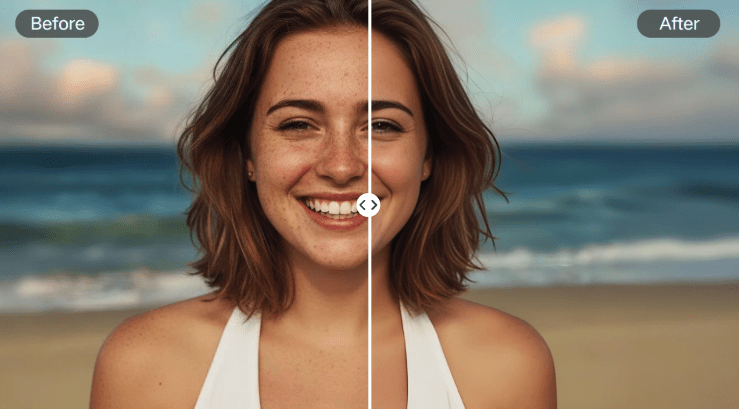
4. Download Your Clear Photo: Before and after sliders let you see the dramatic difference instantly. Once you’re happy with the result, you can download the newly enhanced, high-resolution image to your device.
This straightforward process makes it the go-to solution for marketers, students, designers, and anyone who just wants to fix an old family photo.
Go Beyond Upscaling with a Full AI Photo Editor
Sometimes, a blurry photo needs more than just a resolution boost. It might have poor lighting, unwanted objects in the background, or colors that look faded. For these situations, an all-in-one AI Photo Editor is the perfect companion.
After you’ve sharpened your image with the upscaler, you can use an editor to make additional adjustments. A complete suite of AI tools can help you:
* Correct Colors: Automatically adjust brightness, contrast, and saturation to make your photo vibrant and balanced.
* Remove Objects: Erase distracting elements from your picture, like a photobomber or an ugly power line, with a simple brush stroke.
* Replace Backgrounds: Instantly cut out the subject of your photo and place it on a new background, perfect for product shots or professional headshots.
* Retouch Portraits: Smooth skin, brighten eyes, and remove blemishes with AI-powered portrait enhancement tools.
Using an integrated editor after upscaling ensures your final image is polished and professional from every angle.
Who Can Benefit from an AI Image Upscaler?
AI image enhancement isn’t just for professional photographers. It has practical applications for a wide range of people and professions.
1. Social Media Managers and Marketers
Visuals are everything on social media. A blurry post can hurt engagement and make a brand look unprofessional. Marketers can use an AI upscaler to ensure every image they post is sharp and eye-catching, whether it’s for an Instagram feed, a Facebook ad, or a blog post.
2. E-commerce Store Owners
For online stores, product photos can make or break a sale. Customers need to see clear, detailed images to feel confident in their purchase. An upscaler can turn mediocre supplier photos into crisp, professional-grade product shots that build trust and drive conversions.
3. Students and Educators
Students often need images for presentations and projects. Finding high-resolution pictures can be a challenge. An upscaler allows them to use any image they find, transforming it into a quality visual that elevates their work. Educators can also use it to improve instructional materials.
4. Families and Historians
Old family photos are irreplaceable, but they often suffer from fading, scanning issues, and low resolution. An AI upscaler can breathe new life into these cherished memories, revealing details you may have never seen before and preserving them for future generations.
5. Designers and Artists
Digital artists and graphic designers can use AI upscaling to increase the resolution of their work without losing quality. This is especially useful when a client needs a small design to be printed on a large banner or poster. It allows for greater flexibility and ensures the final print is perfect.
Frequently Asked Questions (FAQ)
If you’re new to AI photo enhancement, you probably have a few questions. Here are some answers to the most common ones.
What is an AI image upscaler?
An AI image upscaler is a tool that uses artificial intelligence to increase the resolution and quality of a photo. Instead of just stretching the image, it intelligently adds new pixels based on its understanding of what the image contains, resulting in a clearer and more detailed picture.
Is using a free upscaler really free?
Yes, many powerful AI upscalers, like the one from Remaker, offer their services for free. There are often generous limits for daily use, which is more than enough for the average person’s needs. This makes professional-quality photo enhancement accessible to everyone.
Will AI make my photo look artificial?
High-quality AI models are designed to produce natural-looking results. They focus on enhancing existing details and adding new ones that are consistent with the rest of the image. The goal is to make the photo look like it was taken with a better camera, not to create a fake or “plastic” effect.
What is the difference between upscaling and resizing?
Traditional resizing simply makes an image larger by stretching the existing pixels. This almost always results in a blurry, pixelated mess. AI upscaling, on the other hand, is a process of enhancement. The AI creates new pixels to fill in the gaps, adding genuine detail and improving sharpness.
Conclusion: Never Settle for Blurry Images Again
Blurry and low-resolution photos are no longer a dead end. With the power of artificial intelligence, you can rescue old pictures, improve web graphics, and ensure all your visuals are sharp, clear, and professional. An AI image upscaler is a simple yet incredibly effective tool that puts the power of complex photo restoration into your hands with just a few clicks.
By using a reliable and free tool, you can instantly fix pixelation, enhance details, and prepare your images for any use, from social media to high-quality prints. Stop letting blurry photos hold you back and start transforming them into the crisp, clear visuals you need.